

The latest news and expert insights for aesthetic practices.
Published on: November 7, 2026
Go BackHow to Connect 4D EMR to Your CRM: Two-Way Sync Setup
If your practice runs on 4D EMR, you know the morning routine. A patient called at 9 p.m. and left a voicemail. Someone booked through the website over the weekend. A few consultation questions came in on Instagram. All of it has to be typed into 4D EMR by hand before the day can really start.
Cosmasol’s 4D EMR integration removes that step. It is a two-way connection: patient data, appointments, and records sync automatically between Cosmasol and 4D EMR, so your front desk never re-enters what a Cosmasol AI agent has already captured.
Table of Contents
Why double data entry costs more than the time it takes
Manual re-entry looks like a small task because each record only takes a minute or two. The cost shows up in the aggregate, and in the records that never make it across.
Here is an illustrative scenario, not a client result. Say a practice handles 15 new inquiries a day across phone, website chat, and social media. At two minutes of data entry per record, that is 30 minutes a day, or roughly 10 hours of staff time a month spent retyping information a patient already gave you once.
The bigger problem is drift. A phone number gets transposed. A consultation request sits in a separate inbox until someone has a free moment. A patient who asked about a procedure on Instagram on Friday night never gets logged, so no one follows up on Monday. None of that shows up as a line item, but it shows up in the consultations you do not book. We have looked at that gap before in how many patient calls a plastic surgery practice misses.
Why re-keyed records go wrong, not just slowly
Double entry is usually described as a time cost, because that is the part you can see on a clock. The harder cost is what it does to the accuracy of your records.
Every manual re-entry is a chance for the record to diverge from what the patient actually said. A digit drops out of a phone number, so the confirmation text never arrives. A name is spelled from memory, so the same patient ends up in 4D EMR twice and neither chart holds the full picture. An email address is typed with the wrong domain, so pre-operative instructions bounce without anyone noticing.
Source attribution is the quietest loss. A consultation typed in by hand usually arrives with no record of where it came from. At the end of the quarter you can see that you booked consultations, but not which ones started as an Instagram message, a returned missed call, or a website chat at midnight. That makes it hard to tell which channel deserves more attention and budget.
A 4D EMR integration removes the retyping step, so what sits in 4D EMR is the record the patient created, with the inquiry and conversation attached to it rather than summarized from memory.
The staff-time scenario, with the assumptions written out
It helps to put numbers on the administrative load, with the assumptions stated plainly, because the figures below are an illustrative scenario and not a measured client result.
Assume a practice handles 25 new patient inquiries a day across phone, website chat, Instagram and Facebook. Assume 60 percent of those, so 15, need a record created or updated in 4D EMR. Assume each one takes three minutes to enter by hand, counting the time to open the conversation, read it, and type the details across.
That is 45 minutes a day, about 3.75 hours a week, and roughly 16 hours a month of typing. At a loaded administrative cost of 25 dollars an hour, the monthly figure is around 400 dollars. The dollar amount is not the interesting part, and it will be different for every practice. The interesting part is that it is a recurring 16 hours that produces nothing a patient will ever see.
Run the same arithmetic with your own numbers before you act on it. If your practice handles five inquiries a day, a 4D EMR integration saves a few minutes and the real argument for it is record accuracy. If you handle fifty, the time argument becomes the larger one.
What the 4D EMR integration syncs, in both directions
A consultation booked by a Cosmasol AI agent at 11 p.m. appears in 4D EMR by morning. A change your team makes directly in 4D EMR appears back in Cosmasol. There is no double entry in either direction.
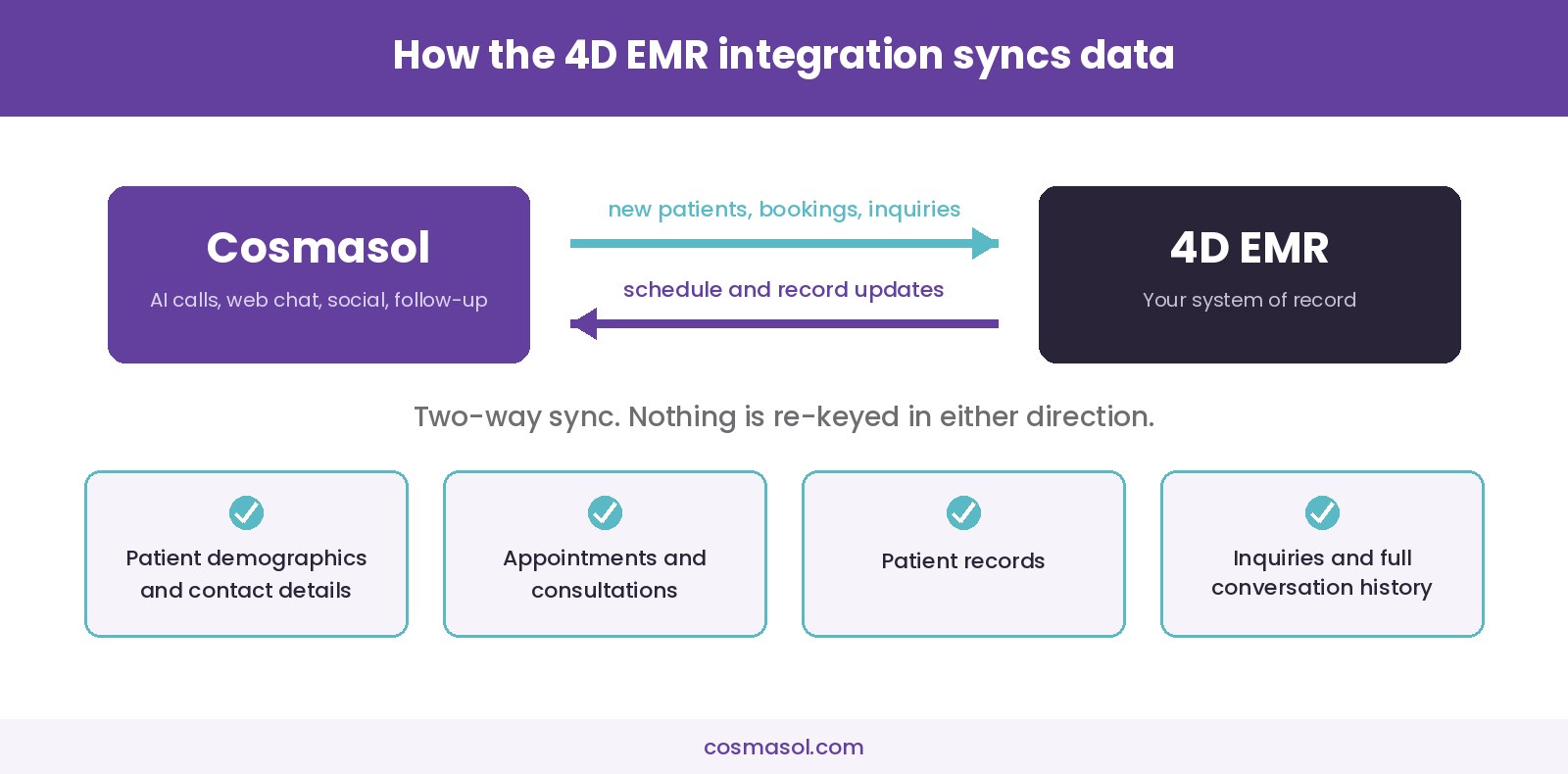
What stays in sync:
- Patient demographics and contact details
- Appointments and consultations
- Patient records
- Inquiries and full conversation history
Your team’s workflow inside 4D EMR does not change. Cosmasol’s AI agents handle website chat, social media messages, phone calls, and follow-up on their end, and everything they capture lands in your system of record automatically.
Why two-way matters more than one-way
Most connections between a front-end tool and an EMR only push data one way. That is enough until the two systems disagree.
If a patient reschedules by phone and your coordinator updates 4D EMR directly, a one-way connection never learns about it. The AI agent still believes the original slot is taken and the new one is open. It can offer a time that is already booked, or follow up about an appointment that moved last week.
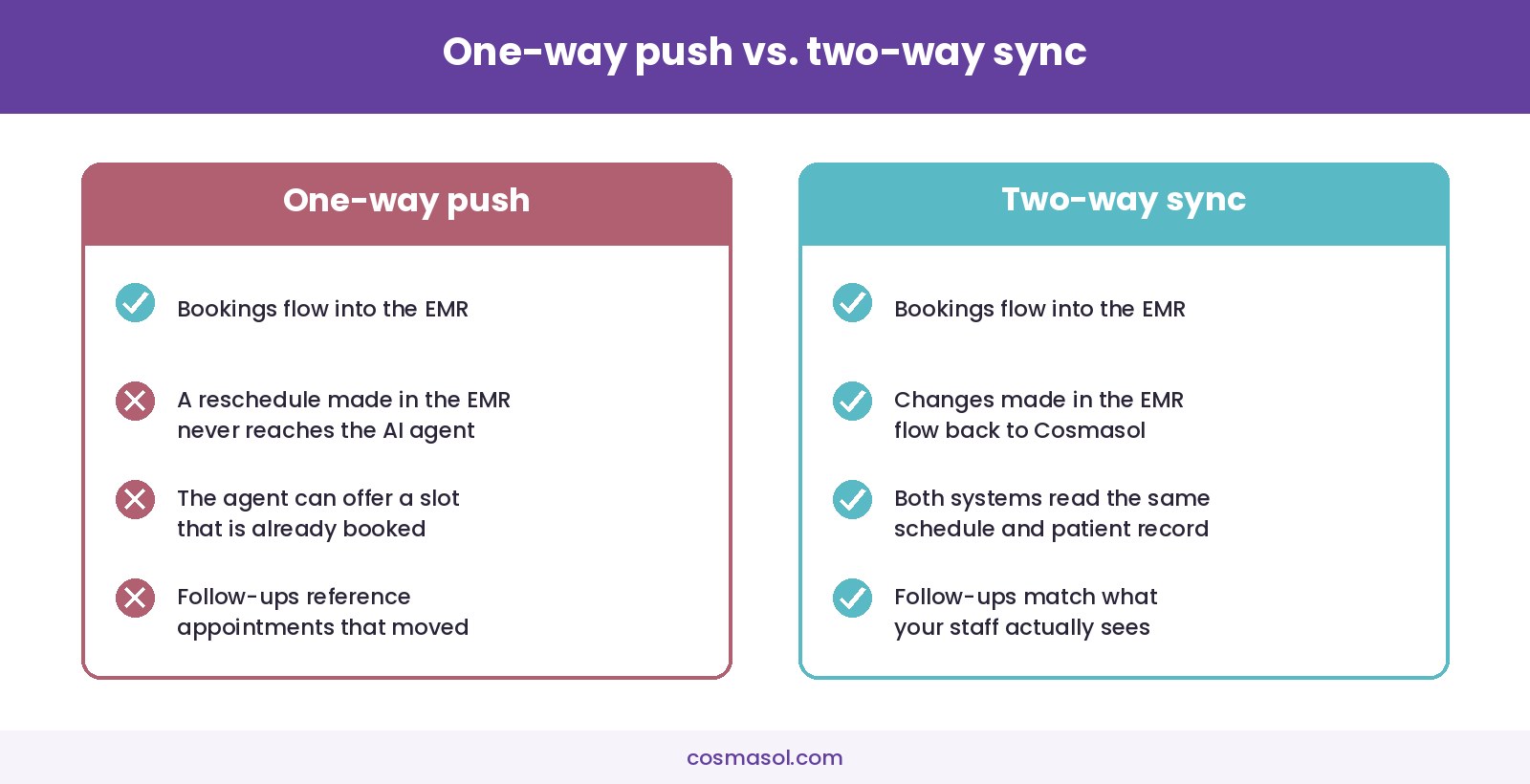
A two-way 4D EMR integration keeps both systems reading from the same picture. Your coordinators keep working in 4D EMR the way they always have, and the AI agents stay accurate because they see the same schedule and the same patient record your staff sees.
How a two-way integration differs from an export
Practices sometimes already have a partial answer in place: a weekly export, a shared spreadsheet, or a report someone emails around on Monday. It is worth being clear about why that is a different thing from a 4D EMR integration.
An export is a snapshot. It is accurate at the moment it is generated and progressively less accurate afterwards, and it still needs a person to read it and act on it. A spreadsheet of last week’s inquiries tells you what happened. It does not create a patient in 4D EMR and it does not hold a consultation slot.
A two-way sync is not a snapshot. The record moves when it changes, in both directions, which is what makes it safe for two systems to hold the same appointment at the same time. That is the specific thing an export cannot do: an export cannot stop an AI agent from offering a Thursday slot your coordinator filled an hour ago.
If your practice is currently bridging Cosmasol and 4D EMR with exports or manual entry, the 4D EMR integration replaces that bridge rather than adding another layer to it.
How the 4D EMR integration gets set up
- Provide access to your 4D EMR account. That is the only thing Cosmasol needs from your practice.
- Cosmasol builds the 4D EMR integration. About 40 hours of work, entirely on Cosmasol’s side.
- Two-way sync goes live. Patients, appointments, and records stay in step between both systems from then on.
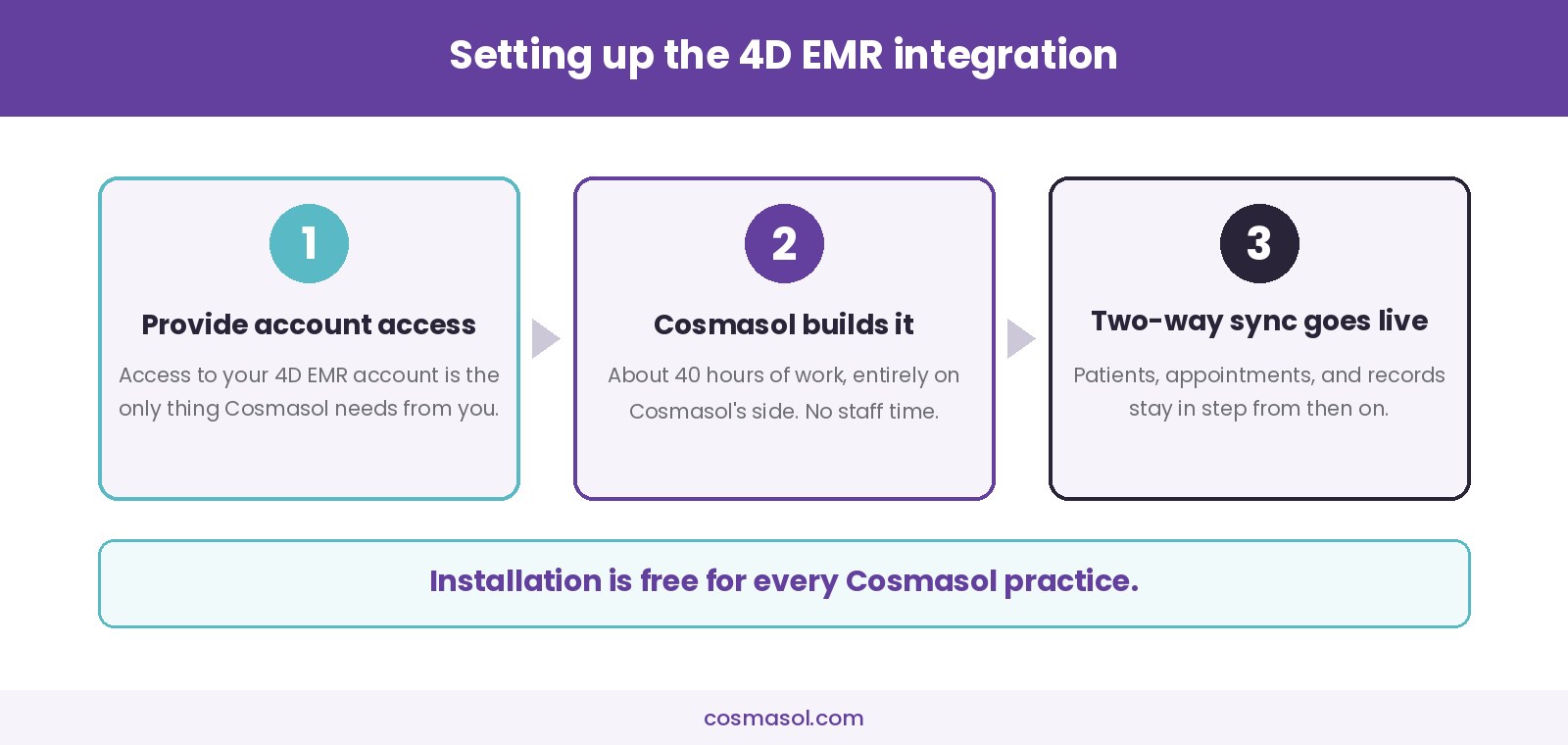
Installation is free for every Cosmasol practice, and there is no implementation work for your staff. No training sessions, no data migration project, and no change to how anyone uses 4D EMR day to day. That is a different proposition from migrating to a new EMR system, which is a project in its own right.
Where the AI agents fit around 4D EMR
4D EMR is the system of record. Cosmasol sits in front of it and handles the patient conversations that happen outside the chart.
- AI Calling Agent answers calls your front desk cannot pick up, including after hours and during procedures
- AI Website Chatbot qualifies inquiries from your site and books consultations
- AI Social Media Chatbot responds on Facebook and Instagram, where a lot of aesthetic inquiries start
- Automated follow-up keeps nurturing the patients who asked but did not book
Each of those channels produces a patient, an appointment, or an inquiry. With the 4D EMR integration in place, each one lands in 4D EMR without anyone retyping it.
What happens to one patient inquiry, start to finish
A worked example is easier to judge than a feature list. Say a prospective patient finds your practice on Instagram at 9:40 p.m. and sends a message asking what a rhinoplasty consultation costs.
The Cosmasol AI Social Media Chatbot answers in the conversation, using the procedure information, policies and pricing guidance your practice loaded during setup. It collects the details a coordinator would ask for: name, phone number, email address, the procedure the patient is asking about, and whether they want to come in. If the patient is ready to book, the agent offers available consultation times and confirms one.
Without a connection to your records, that is where the trail stops and a person picks it up. Someone opens the conversation the next morning, reads it, and types the patient into 4D EMR by hand. With the 4D EMR integration in place, the patient record and the booked consultation are already in 4D EMR when your coordinator logs in, with the inquiry and the conversation history behind it.
The practical difference is what your coordinator does at 8:30 a.m. In the first version, the work is transcription. In the second, the work is preparation: reading what the patient already said, checking the record is complete, and getting ready for the consultation.
Which practices get the most out of a 4D EMR integration
4D EMR is cloud-based practice management and charting software built for plastic surgery, cosmetic surgery, and aesthetic practices, and it was designed by a practicing plastic surgeon. Practices running it tend to be the ones this integration helps most:
- Practices with high inquiry volume across phone, web, and social
- Practices where consultations arrive after hours and sit unanswered overnight
- Practices with one or two coordinators handling intake for multiple providers
- Multi-location practices where intake and records are managed by different people
If your practice already runs on 4D EMR, the integration closes the gap between how patients reach out and how your team keeps records. An after-hours inquiry on your website or Instagram does not sit in a separate inbox waiting to be typed in the next day. It is already there, booked and documented, by the time your staff logs in. If you are still deciding on a platform, our guide to choosing plastic surgery EMR software covers what to look for.
What changes for each role in the practice
The 4D EMR integration is not a change to clinical work. It is a change to administrative work, and it lands differently depending on the job.
- Front desk. Fewer inbound calls that exist only to capture information an AI agent already captured, and no queue of overnight messages to transcribe before the first patient arrives.
- Patient coordinators. Consultations arrive in 4D EMR with the inquiry and conversation history attached, so the first real conversation starts from what the patient already said rather than from a blank form.
- Practice managers. One place to look. Because the 4D EMR integration syncs both ways, the schedule in 4D EMR and the schedule the AI agents work from are the same schedule, which removes the end-of-day reconciliation step.
- Surgeons and injectors. No change to charting, templates or clinical workflow. The chart is still in 4D EMR and still built the way your practice builds it.
- Marketing. Inquiries carry their origin into the record, so channel performance becomes a question you can answer from your own data instead of estimating.
None of this removes the need for staff. It removes a category of work that staff were doing because two systems could not talk to each other.
What to confirm before you connect anything to your EMR
An EMR holds protected health information, so any system that connects to it deserves the same scrutiny you would give a new staff member with chart access. These are worth asking of Cosmasol or any other vendor before a 4D EMR integration goes live.
- Which records move, and which do not. Get the list in writing. A sync that covers demographics and appointments is a different risk profile from one that reaches clinical notes or photos.
- Whether a business associate agreement is in place. Any vendor handling PHI on your behalf should sign one. Ask for it before access is granted, not after.
- How access is provisioned. Ask whether the vendor can work from a dedicated account with scoped permissions rather than a shared or administrator login, and whether that account can be audited and revoked separately.
- What the audit trail looks like. You should be able to see which records the 4D EMR integration created or changed, and when.
- How you turn it off. Know in advance who disables the connection, how long it takes, and what happens to data already synced.
None of this is unique to Cosmasol or to 4D EMR. It is the same checklist any aesthetic practice should run before granting a third party access to its system of record, and a vendor that answers these clearly is easier to work with later.
What the 4D EMR integration does not do
It is worth being specific about scope, because “integration” gets used loosely.
- It does not replace 4D EMR. 4D EMR stays your practice management and charting system, and your team keeps working in it.
- It does not move your historical data into Cosmasol as a migration project. The sync keeps the two systems current going forward.
- It does not change your clinical workflow, templates, or charting. Those stay where they are.
- It does not remove the need for a human on your team. The AI agents handle intake, scheduling, and follow-up conversations, and your coordinators handle the judgment calls that follow.
The narrow description is the accurate one: this is a 4D EMR integration that keeps patient, appointment, and record data current in both systems so nobody has to retype it.
Frequently asked questions
Is the Cosmasol 4D EMR integration two-way?
Yes. Data syncs in both directions. Appointments and patient details captured by a Cosmasol AI agent flow into 4D EMR, and changes your team makes in 4D EMR flow back to Cosmasol.
How long does the 4D EMR integration take to set up?
About 40 hours of build work, all of it on Cosmasol’s side. Your practice provides access to your 4D EMR account and does not need to assign any staff time to the project.
Does the 4D EMR integration cost extra?
No. Installation is free for every Cosmasol practice.
Does my team have to change how they use 4D EMR?
No. Your workflow inside 4D EMR stays the same. The 4D EMR integration runs in the background, and your coordinators keep working in the system they already know.
What data syncs between Cosmasol and 4D EMR?
Patient demographics and contact details, appointments and consultations, patient records, and inquiries along with their full conversation history.
Will after-hours inquiries show up in 4D EMR?
Yes. That is the main point of the 4D EMR integration. A consultation a Cosmasol AI agent books at 11 p.m. is in 4D EMR before your front desk opens the next morning.
Does the 4D EMR integration change how my charts look in 4D EMR?
No. The integration writes patient details, appointments and inquiry history into 4D EMR and reads changes back out. Your chart templates, note formats and clinical workflow inside 4D EMR stay exactly as they are.
What happens to inquiries that came in before the 4D EMR integration was connected?
The integration keeps the two systems in sync going forward. It is not a historical data migration, so records created before the connection went live stay where they are unless you move them across separately.
Using 4D EMR? Connect it to Cosmasol.
Start a trial, provide access to your 4D EMR account, and the Cosmasol team sets up the 4D EMR integration for free.
Sources
- 4D EMR – product overview, specialties served, and cloud-based platform details. Accessed November 2, 2026.